


Budget-Savvy Routing Solutions
From route optimization to voice navigation, mobile phone mapping and search engine integration, these familiar software and web-based mapping tools offer enhanced trip planning for little to no cost.


A well-tailored mapping solution can help make any business driver more efficient, and making sure the tool is modified to fit certain needs doesn't have to be expensive. Most web-based map services offer many of the same advanced features as highly customized solutions, minus the giant price tag.
Navigating on a Dime
With a $40 installation cost and a $40 renewal fee every other year, Microsoft Streets and Trips has become the go-to resource for Ron Day's Fibrenew franchise, a leather repair business based in Southside Atlanta.
With his laptop and separately purchased USB GPS receiver in tow, Day uses the software's routing capability to plan a week's worth of trips or to update directions as needed during a route. Day says Streets and Trips' turn-by-turn voice navigation also has proved to be a valuable benefit while he's on the road.
Users can plug in an entire day's worth of addresses and click on the "Maximize Route" button. The software provides a plan that includes estimated times of arrival and distance and can take into account parameters such as driving speeds, road types, and start and stop times.
Streets and Trips also allows users to view and print street view maps that show side streets in detail or wide view maps that show interstates and freeway exit locations.
"I can call the night before I route every [customer] and say, 'I'm going to be there at this time,'" Day says. "It really helps cut down on time."
Free and Functional: Google, Bing and Mapquest
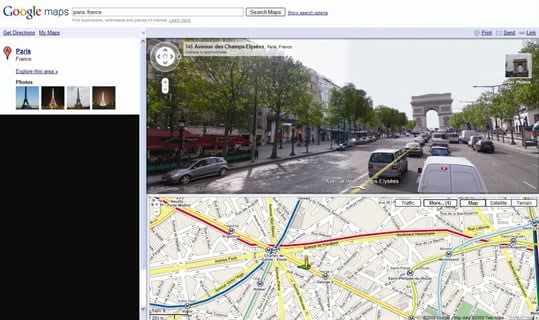
Google Maps' now-famous Street View can be incorporated into driving directions.
A variety of free, web-based tools are available on the Internet for anyone to use, each packed with useful features like road, street and satellite views, simple route planners, live traffic updates or parameter settings to help create custom routes off the cuff.
While charting a route with a free map tool can be as simple as entering in a starting and ending address and clicking on "Get Directions," Microsoft's free Bing Maps tool incorporates results from the parent search engine. Google Maps does the same, typically including contact information and hours of business.
Other free mapping services such as MapQuest incorporate a toolbar with options for toggling views of local businesses like gas stations, ATMs, lodging and airports. Users can also type in their own terms to find locations by category (e.g., "post office" or "airport"). Unleaded regular fuel prices are also available and are updated daily.
In place of a map toolbar or tool tabs, Bing Maps offers more than 60 "Map Apps" that include distance calculators, parking finders, traffic camera views, dataset displays and weather updates. RouteSavvy, a Bing Map App created by third-party publisher OnTerra, allows users to enter up to 100 addresses and receive an optimized route between their destinations, according to Microsoft.
In addition, map tools often have route planners integrated into the main tool or in separate browsing windows. Google's multiple-stop route options, for example, are part of the standard map, while MapQuest and Bing Maps offer separate route planning tools that offer more customizability.
MapQuest's free Route Planner, available as its own website, can calculate routes with up to 26 stops. The Route Planner offers parameter selections that include choosing between the shortest time and the shortest distance or allowing the map to efficiently re-order stops. Business drivers are using the tool for mileage reimbursement, says Anke Corbin, vice president of marketing and distribution at MapQuest.[PAGEBREAK]
Three More Free Map Tools
Among typical map services, NAVTEQ Map24 has a customizable route configurator that allows users to select type of vehicle, means of travel (interstate, road, or minor road) and amount of highway use and road type.
Free Map Tools offers more than 30 tools for creating, measuring and saving maps to share with others, including "How Far Is It In Between?" for measuring distances, Time Zone Converter, Radius Around Point and Area Calculator. The Meeting COG for ZIP codes tool offers the closest location to hold a meeting by processing attendees' ZIPs.
Rand McNally offers a user-friendly interface for obtaining directions and maps, as well as useful travel guides with information, photos and videos for a large number of cities across the United States.
Mapping on a Mobile Phone
Depending on the map tool of choice, fleet managers can share finished maps and directions with drivers via email, text message, iPad or a pre-installed navigation device. Both Google Maps and MapQuest are available in a mobile application version, while Bing Maps is available as part of the Bing mobile app for phones and the iPad.
Fibrenew Atlanta Northwest franchisee Bill Metropol uses Google Maps on his BlackBerry phone to set up destinations the day before and checks BlackBerry Traffic en route to keep his directions updated. By using a phone cradle in his vehicle, Metropol can get in, touch the screen and go, he says.
Metropol uses Google Maps' rerouting feature on the fly. To add a stop to a route, "You can place your cursor over the highlighted route on the Google map and drag that road in the middle like a rubber band and stretch it in another direction," he adds. "The map will automatically adjust for you."

MapQuest's free Route Planner, available as its own website, can calculate routes with up to 26 stops.
Metropol also uses the Yellow Pages mobile app to find local businesses quickly when he's out on a call and short on time. The app can pull up all locations of a certain type of business - say, dentists who may be in need of leather repair - then navigate to those locations and provide URLs and phone numbers.
Standard GPS services with voice navigation can be very costly, so the voice navigation feature on MapQuest's free mobile app has been met with a warm response, MapQuest's Corbin says. To keep drivers on time, the app also features an estimated time of arrival function.
Last year, business traveler and IT professional Paul Braren of Wethersfield, Conn., decided to replace his portable GPS device with an iPhone 4. He uses NAVIGON Mobile Navigator software on his phone and syncs addresses from his computer using Apple's MobileMe service.
"Before I head out, I run NAVIGON on my phone and I point it to my address book and the different places I'm going," Braren says. "If I get a business-related call, I can take the call and just keep my hands on the wheel of the car. As soon as I hang up, it returns me to the directions."
At $49.99, NAVIGON is a bit pricey for an iPhone app, Braren says - but well worth the cost. "During 10 to 20 mile trips, I spend half as much time in the car as I would without NAVIGON," he says.
Live traffic updates on the app that reroute around trouble automatically "have saved my skin," Braren says.
Originally posted on Work Truck Online
More Articles

A Behind-the-Scenes Tour of a Fleet Upfit Facility
Get a behind-the-scenes look at how Driverge takes fleet vehicles from pilot builds to production and shipping.
Read More →
EV Charging Use Is Outpacing Infrastructure Growth
ChargePoint’s 2026 Charging Forward Report points to rising charger use, higher-powered charging, commercial vehicle electrification, and energy-management technology. Here’s what fleets should know.
Read More →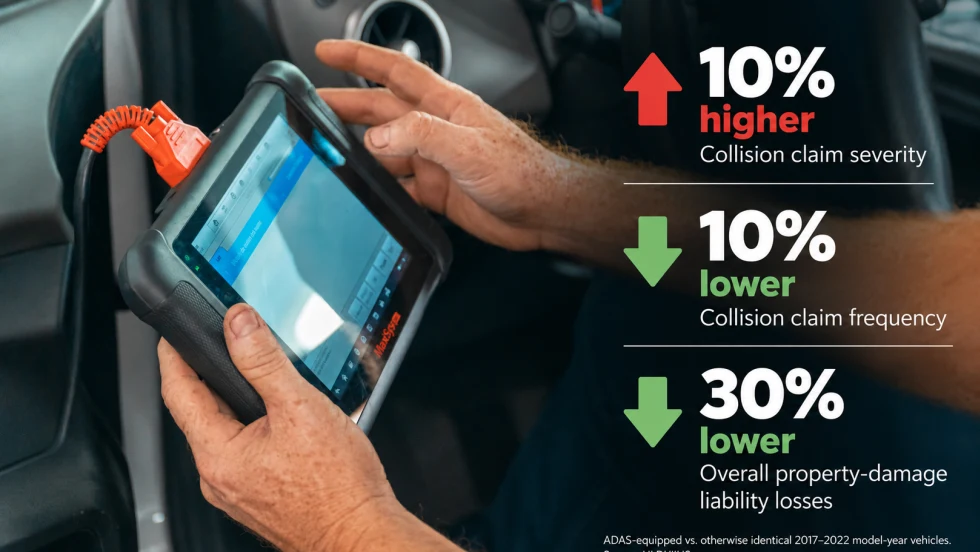
The Economics of ADAS: Fewer Crashes, Higher Repair Costs
IIHS data shows that crash-avoidance technology can increase individual repair costs while reducing overall losses. For fleets, downtime and calibration add another layer of cost.
Read More →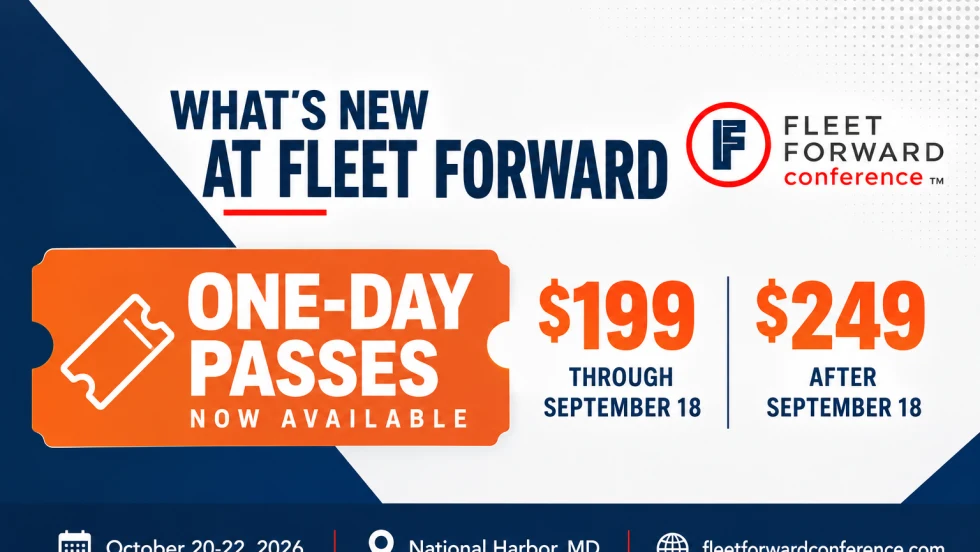
Fleet Forward Conference Introduces One-Day Passes for 2026
New one-day registration gives fleet professionals the flexibility to attend Tuesday, Wednesday, or Thursday, with passes available for $199 through Sept. 18.
Read More →
Holman Takes Full Ownership of ARIZA in Mexico
Holman is bringing its Mexican fleet management operation fully under its own brand after more than 30 years as a joint venture. The change gives multinational fleet customers a single Holman operation across the U.S., Canada, and Mexico.
Read More →
Nexar-Nauto Merger Aims to Give Fleets Better Safety Intelligence Through Larger Driving Dataset
Stefan Heck tells Automotive Fleet that combining more than 10 billion miles of driving history with Nexar's AI models will give fleets deeper insights into driver risk and roadway conditions than either company could provide independently.
Read More →
Don't Wait for a Crisis: 5 Ways to Build Mental Health Into Your Fleet Safety Program
For Suicide Prevention Month, fleet and safety leaders have an opportunity to put mental health where it belongs: at the center of workplace safety.
Read More →
Fleet Has a Talent Pipeline Problem. What Comes Next? | AF News Recap
Where will fleet’s next generation of leaders come from? This week, we’re looking at the industry’s talent pipeline, what certification can add to a fleet career, how to build an award-worthy track record, and the return of Automotive Fleet’s Personal Use Survey.
Read More →
How AI Can Support Smarter Fleet Maintenance Decisions
AI can help fleets anticipate maintenance needs and make better decisions, but realizing its value starts with clean data, strong processes and measurable results.
Read More →
Copart to Acquire ACV in $1.9 Billion Deal
The acquisition would expand Copart beyond its traditional salvage business into dealer-to-dealer wholesale remarketing while adding ACV’s vehicle data, inspection, and valuation technology.
Read More →